
Binance Guides
Binance KYC Requirements: Documents, Time, Pending and Rejected
Prepare for Binance KYC with the right identity documents and camera setup, then troubleshoot verification time, Pending, Rejected, and source-of-funds requests.
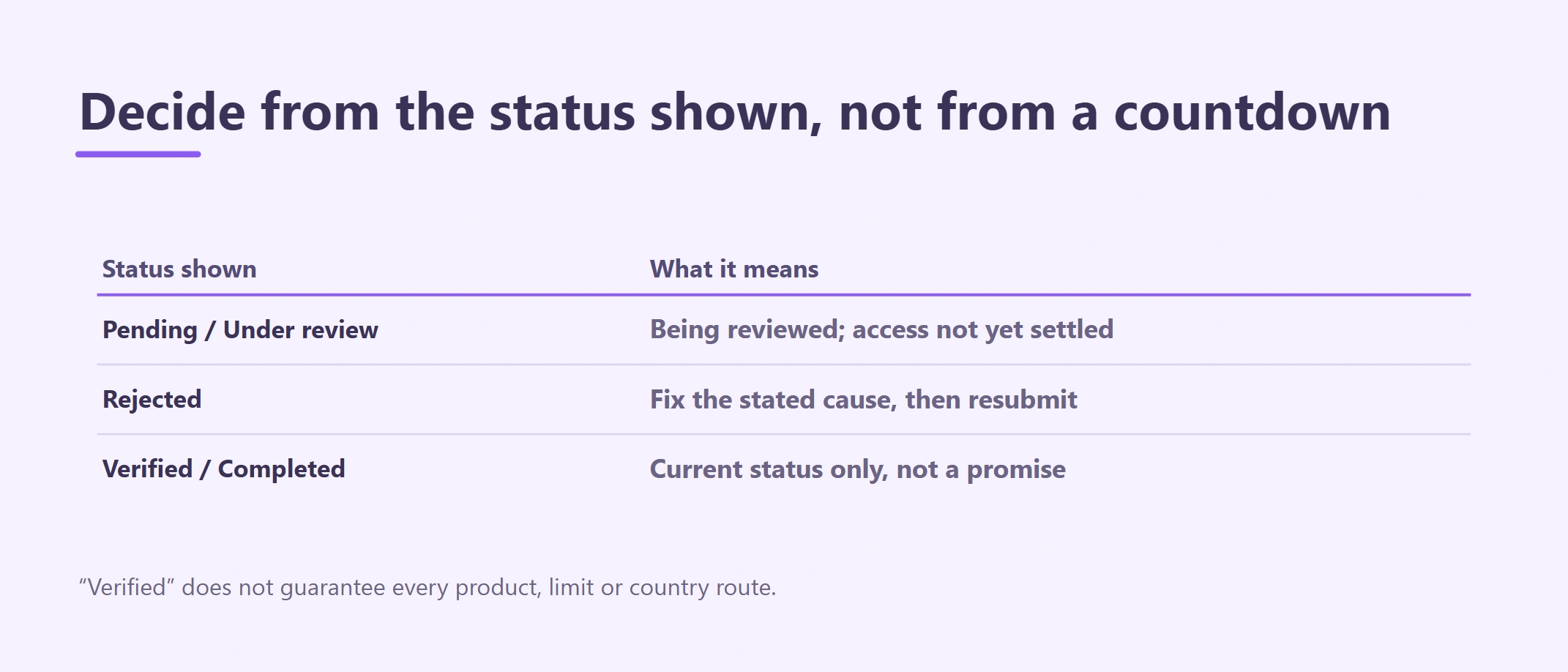
Binance KYC requirements vary by country, serving entity, account type, and risk review, but the core task is consistent: your personal details, document, camera capture, and any source-of-funds explanation must describe the same real person and activity. This guide also explains verification time, Pending, and Rejected outcomes. Official sources reviewed August 26, 2026.
Identity verification, often called Know Your Customer or KYC, links an account to a real person or entity. Binance states that an account can be created before identity verification, but access to trading and other activities may remain limited until KYC is complete. Requirements vary by country, serving entity, account type, product and risk review.
This article covers identity-verification preparation, submission and status problems. Registration, account hardening and funding remain separate tasks with their own guides.
What “KYC complete” means
Do not confuse these stages:
| Stage | What has happened | What has not been proven |
|---|---|---|
| Contact verified | Email or phone code was accepted | Your identity is not yet verified |
| Submitted | Documents and checks were sent | Review is not complete |
| Pending / Under review | Binance is reviewing the submission | Approval and product access are not confirmed |
| Verified / Completed | The account shows a final approved status | Every product, limit or country route is not guaranteed |
| Action required / Rejected | A problem or additional request exists | Repeated resubmission is not the solution |
The process is complete only when your own account shows a final verification status, no unresolved request remains, and the product you need is actually available to that account.
Confirm region and account type first
Start from the official app or domain. Read the legal-entity and location notices. Do not use a VPN, false residence, altered document, or another person's identity to make an option appear.
If a registered business will own the funds, stop and confirm whether an entity account is required. Personal KYC does not establish a company's ownership, beneficial owners, or operator authority.
Readers in Cambodia should check current local information rather than treating a successful Binance screen as proof of local authorization. Review the current SERC sandbox list and NBC Prakas and Circulars when deciding whether and how a service may be used.
Binance KYC requirements: documents and camera setup
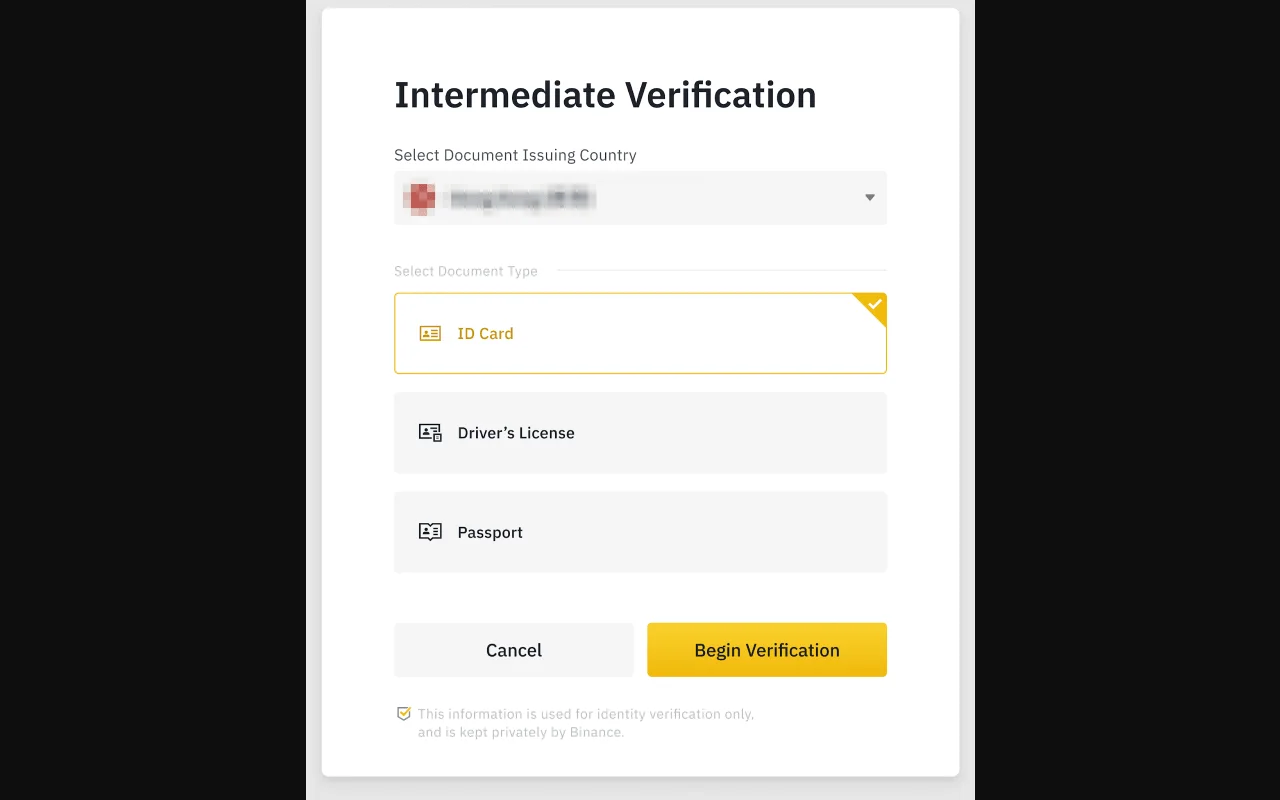
Official Binance verification example; the country is intentionally obscured. Use only the document types and issuing country shown as eligible in your own live account.
Only the live verification screen can tell you what is accepted for this submission. Common preparation includes:
| Prepare | Quality check | Do not do |
|---|---|---|
| Full legal name, birth date, nationality and residence | Match the requested document and script | Do not invent an English spelling or nickname |
| Unexpired government photo ID | Original, readable, all edges visible | Do not edit, filter, crop required fields or use a screen photo |
| Address evidence, if requested | Correct name, address, issuer and recent date | Do not upload an unrelated statement |
| Selfie or liveness check | Clean lens, even light, stable connection | Do not use a recording or another person |
| Personal device and official app/browser | Updated OS, screen lock, trusted network | Do not use remote-access “help” |
| Source-of-funds records, if requested | One consistent trail from origin to deposit | Do not fabricate or split transactions to avoid review |
For Khmer documents, enter the spelling and script exactly as the form and document require. If the form asks for a Latin transliteration, use the official form shown on your document or follow the on-screen instructions; do not improvise multiple versions across submissions.
How to complete verification, step by step
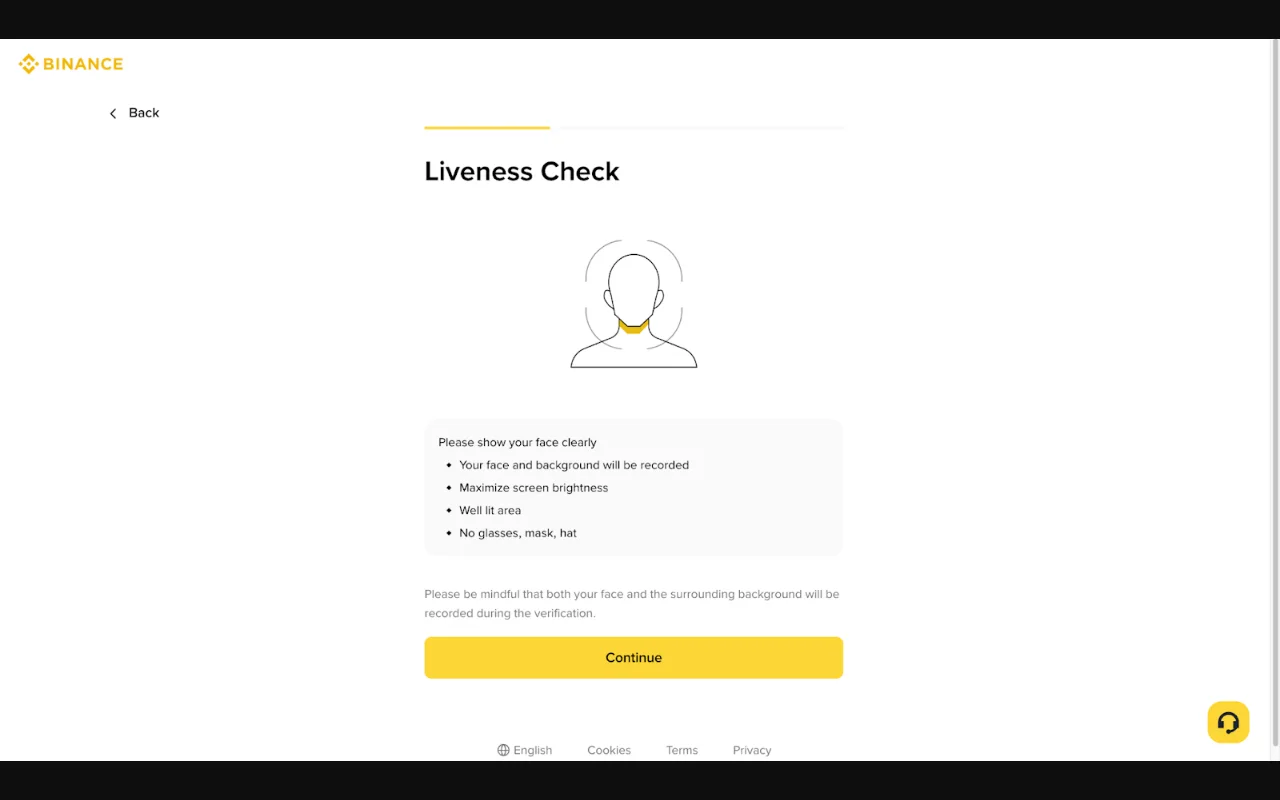
Official Binance liveness-check interface. Perform this step only inside the verified Binance flow; never send a selfie or video to a person claiming to be an agent.
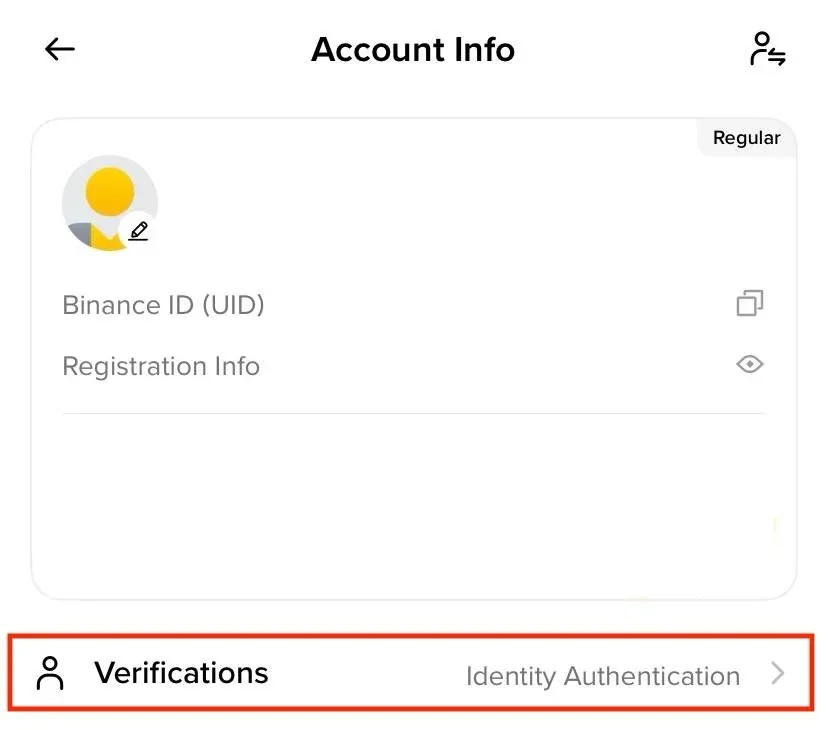
Binance Academy's public identity-verification example, checked 2026-08-26. Your eligible account's document list and capture prompts take precedence over the example. Open verification only from your own Account Info or profile area; never submit an ID through a message or third-party form.
1. Enter through the official account
Sign in from a trusted bookmark or the official app. Open Identity Verification from the account/profile area; labels may differ. Confirm the displayed country, account type and accepted document options before starting.
2. Match personal data before capture
Compare the name order, spelling, date of birth, nationality and residential address with the selected document. Correct account data through the official flow rather than changing document images.
3. Capture the original document
Use even lighting and a plain background. Keep all requested edges and security features visible. Avoid glare, blur, fingers over text, filters, screenshots and photocopies unless the live screen explicitly accepts them.
4. Complete selfie or liveness checks privately
Use your own device in a private place. Close screen sharing and remote-access tools. Follow movement prompts without another person in frame. No legitimate verifier needs your OTP, password, passkey secret, authenticator recovery key or wallet seed phrase.
5. Review before submitting once
Read each field again. Confirm that the document type, issuing country and expiry date are correct. Submit once, note the date and time, and save the case or status reference without storing unnecessary copies of the ID in chat apps.
6. Read the status, not a stranger's promise
Pending means wait or supply the specifically requested item through the official secure upload. Rejected means read the stated cause before retrying. Never pay a social-media “agent” to accelerate approval.
Source-of-funds example for a client payment
Suppose a freelancer receives a USD 500 invoice in USDC. A consistent set of records could contain:
- the client agreement or purchase order;
- invoice number, date, service description and USD 500 amount;
- the agreed USDC asset and blockchain network;
- payer and recipient transaction records, including the TxID;
- wallet or exchange statement showing receipt;
- conversion and bank-withdrawal record if the funds are later cashed out.
The documents should tell one consistent story. Do not create records after the fact with false dates, hide the commercial purpose, or break the amount into smaller transfers to avoid controls.
Fix the cause of Pending or Rejected status
| Status or error | Check first | Safe next action |
|---|---|---|
| Name or birth-date mismatch | Order, spelling, script and date format | Use the official correction/resubmission path |
| Document unsupported or expired | Type, issuing country, validity and live accepted list | Use a valid original that the screen accepts |
| Image-quality failure | Corners, glare, blur, crop and camera permission | Recapture once in even light; do not edit |
| Face-check failure | Lens, light, connection and movement prompt | Retry in a stable private setup; stop at any attempt limit |
| Residence conflict | Actual residence, selected country and document | Correct truthful data or ask official support |
| Source-of-funds request | Requested period, format and secure upload location | Supply only relevant genuine records and keep the case number |
| Review remains Pending | Account notice and whether more information was requested | Wait or ask official support; do not open duplicate accounts |
There is no universal approval time. The account status and a dated official support response are more reliable than another user's experience.
Privacy and security rules
- Do not email or message full ID images unless the official secure flow explicitly directs you there.
- Do not publish screenshots containing name, date of birth, document number, address, face, QR code, UID or verification status.
- Do not give an “agent” remote access to your phone or computer.
- Preserve the status, date and case number; minimize extra copies of the underlying documents.
- If the request arrives through Telegram, WhatsApp, social media or an unknown email, stop and reopen support from the official account.
You are done with KYC only when
You are ready to move on only when:
- the account shows Verified, Completed or the equivalent final status;
- your legal details are accurate;
- there is no Pending or Action Required notice;
- your email, password, passkey or 2FA and recovery methods are secured;
- the intended product and deposit route are available in your own account.
Then complete the securing a Binance account and use the Binance deposit and withdrawal troubleshooting before a small test deposit. If you do not have an account yet, return to the registering a Binance account safely.
Frequently asked questions
Does KYC approval mean all Binance products are available? No. Product, limit and regional eligibility can be separate.
Should I upload more documents than requested? No. Supply the requested material through the official secure flow and minimize unnecessary exposure.
Can another person complete liveness for me? No. Borrowed identity or account access creates security, compliance and legal risk.
Should I create a second account after rejection? Not as a shortcut. Read the cause and use official correction, appeal or support.
Binance KYC verification time: decide from status, not a countdown
There is no universal Binance KYC verification time that applies to every country, document and review. Use the status and the account's own dated notice to decide what to do:
| Account state | Your next action |
|---|---|
| Draft / not submitted | Finish only from the official account flow |
| Submitted / Pending with no request | Record the submission time and wait within the current on-screen guidance |
| Action Required | Supply the exact requested item once through the secure upload path |
| Rejected with a stated cause | Correct that cause before a permitted resubmission or appeal |
| Pending beyond the current guidance | Open official support with the status, submission time and case reference |
| Verified / Completed | Confirm that the needed product and region are also available |
Do not measure the wait from another person's forum post, and do not restart repeatedly just to reset the clock. Preserve the status message, date, timezone and case number. If support asks for more information, verify that the request appears in your signed-in account before uploading identity or source-of-funds records.
Official sources
- Binance Academy: Complete Identity Verification
- Binance Academy: Binance Beginner's Guide
- FATF: Virtual Assets
- SERC: FinTech Regulatory Sandbox
- NBC: Prakas and Circulars
Educational information only, not legal, financial, or approval advice. Verification requirements, accepted documents, privacy notices, and service availability can change.