
Binance Guides
How to Secure a Binance Account: 2FA and Anti-Phishing
Secure a Binance account before funding it with email protection, a unique password, passkey or 2FA, anti-phishing code, device review, and withdrawal controls.
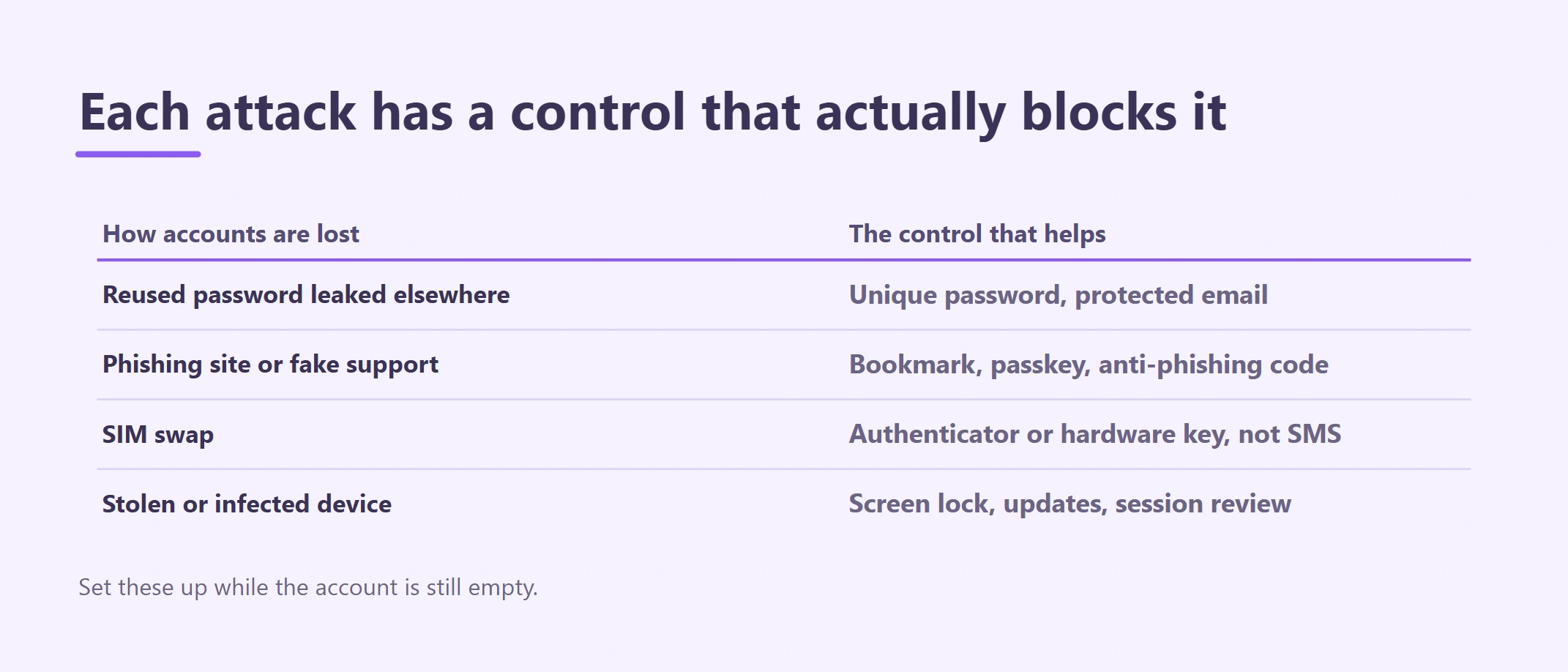
This guide explains how to secure a Binance account before adding funds: protect the connected email, use a unique password, enable a passkey or strong 2FA, set an anti-phishing code, review devices, and configure withdrawal safeguards. Treat those controls as one chain rather than assuming 2FA alone prevents account takeover. Official sources reviewed August 26, 2026.
Most account takeovers exploit recovery, communication or device weaknesses around the exchange login. That is why the checks begin with the connected email and end with a response plan, rather than treating 2FA as the whole job.
This article hardens an existing empty account. Account creation, KYC and transfer execution remain separate tasks with dedicated guides.
How Binance accounts actually get taken over
| Risk | Typical entry point | Most useful control |
|---|---|---|
| Reused-password attack | Credentials leaked by another website | Unique password and protected email |
| Phishing | Search ads, cloned domains, fake email or support | Bookmark, passkey/2FA and anti-phishing checks |
| SIM swap | Phone-number takeover | Authenticator, passkey or hardware key where suitable |
| Device theft or malware | Unlocked phone, remote access, clipboard change | Screen lock, updates, device review and independent address check |
| Withdrawal hijack | New malicious destination | Address allowlist and review delay where offered |
| Recovery loss | Lost phone or authenticator | Tested offline recovery plan |
| Social engineering | Urgent “support” or recovery agent | Stop rule and official support path |
Your priorities may change if you travel frequently, share business devices, use an API or manage company funds. Do not weaken controls merely to make the first deposit faster.
1. Secure the connected email first
The email account may receive login alerts, recovery messages and withdrawal confirmations. Give it a unique password and strong second factor that is not dependent only on the same phone number. Review email forwarding rules, recovery addresses, active sessions and trusted devices.
If an attacker controls your email, an exchange password alone may not protect you. Do not use a shared work inbox or an address that another person can recover without your approval.
2. Create a unique account password
Generate a long, unique password with a reputable password manager. Do not reuse the email password or a pattern used elsewhere. Never paste it into chat, email or a screen-sharing session.
If you suspect exposure, change the password from a trusted device and read any live notice about temporary security restrictions. Do not assume withdrawals remain immediately available after a sensitive account change.
3. Choose the strongest practical login factor
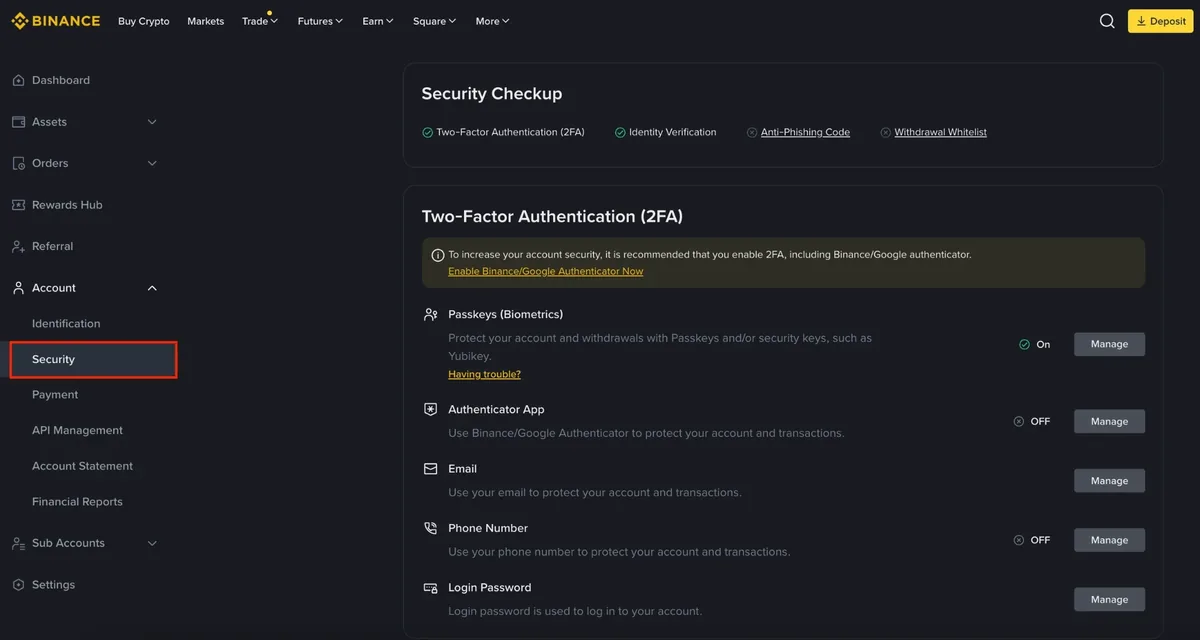
Binance Academy's public Security-page example, checked 2026-08-26. Compare the available controls with your own account because menu labels and regional options can differ. No UID, email, phone number or balance appears in this official example.
Use the strongest option supported by your account and devices:
| Method | Main advantage | Important caution |
|---|---|---|
| Passkey | Phishing-resistant when used on the intended domain/device | Plan recovery across trusted devices |
| Hardware security key | Requires physical possession | Keep a tested spare or recovery path |
| Authenticator app | Strong practical option without SMS delivery | Store recovery key securely offline |
| SMS | Better than password alone | Vulnerable to phone loss, interception and SIM swap |
Adding multiple factors can help only if recovery remains controlled. Do not photograph an authenticator recovery key or store it beside the account password in the same cloud note.
4. Test recovery before adding funds
Record which email, phone, passkey, authenticator or hardware key is connected—without recording passwords or one-time codes. Store recovery material offline in a place you control. Confirm that your device lock, backup and recovery path work.
Ask: if this phone disappeared now, could I regain access through an official process without asking a stranger? If the answer is unclear, the account is not ready for funding.
5. Set and verify the Binance anti-phishing code
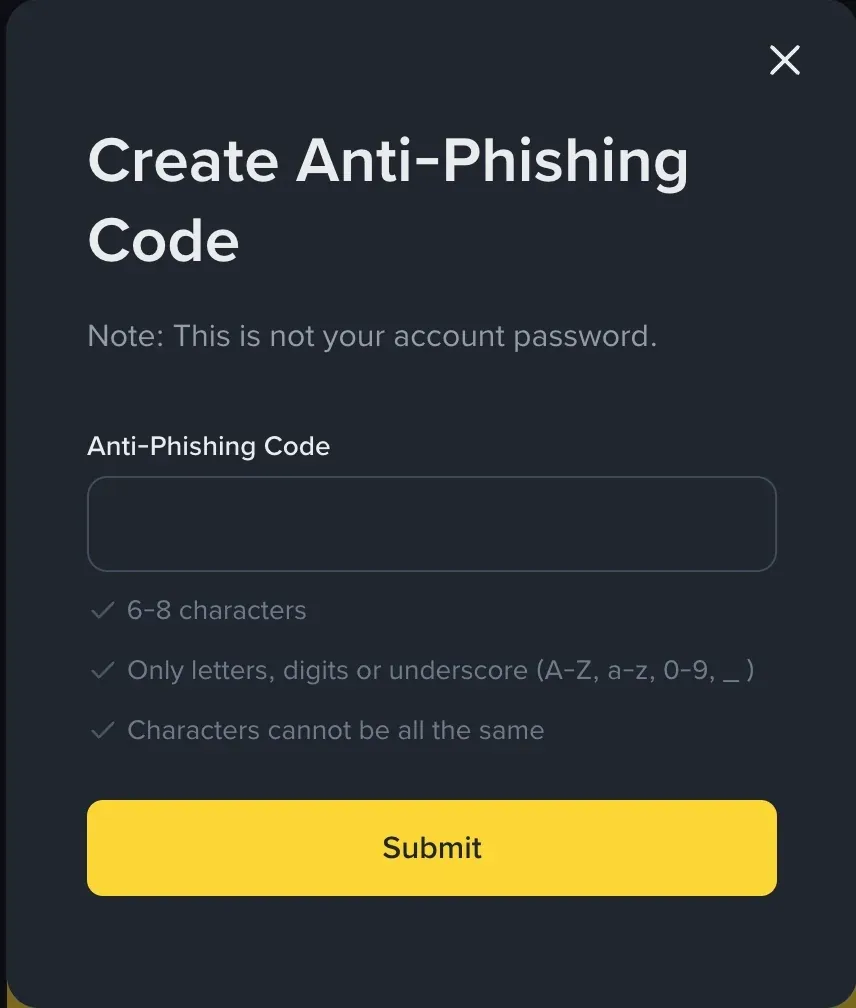
Official Binance Academy example, checked 2026-08-26. The field is empty; create your own private code and do not reuse a password.
If the live Security page offers an anti-phishing code, create a private phrase that is not your password or a public nickname. Binance explains that the code can appear in official notification emails, helping you identify messages that lack the expected code.
The code is one signal, not proof. A correct-looking message can still contain a dangerous request. Inspect the sender, domain, timing and action; open the account independently instead of clicking the message.
6. Review devices, sessions and account activity
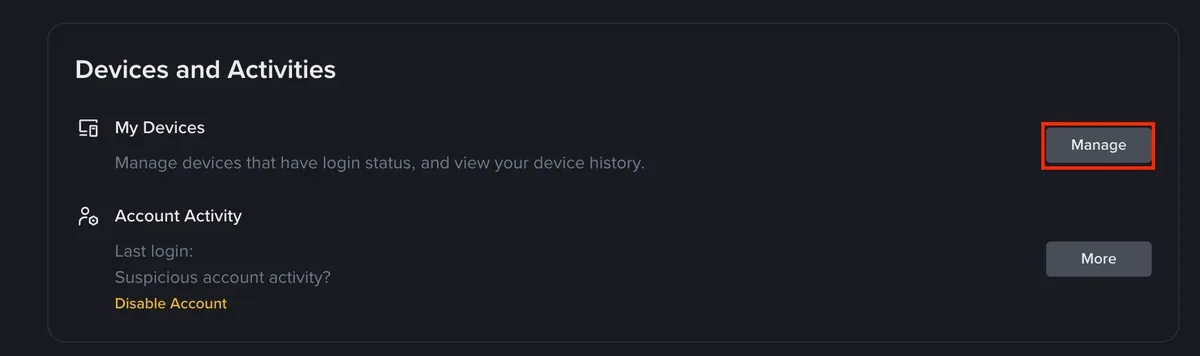
Official Binance Academy example, checked 2026-08-26. Review this area from your own authenticated account and remove devices you do not recognize.
Remove devices you do not recognize or no longer use. Review recent access time and location for anomalies. Update the operating system, browser and official app. Avoid shared computers and devices with unknown management profiles or remote-access software.
If activity is suspicious, preserve screenshots with personal data masked, secure email first, use the official account protection/disable controls available to you, and contact support from the official site or app.
7. Set withdrawal safeguards
Review address management, withdrawal allowlisting, new-address confirmation and any security delay shown in your account. An allowlist is useful when you regularly withdraw to a small set of wallets, but adding an address is itself a high-risk action.
For every allowlisted address:
- generate or reopen the destination in the receiving wallet;
- confirm asset, network, address and memo/tag;
- verify through a second trusted channel or display;
- give the address a label that identifies owner and network without exposing secrets;
- respect any live cooling-off period;
- test a small transfer before relying on it.
Use the Binance deposit and withdrawal troubleshooting before sending.
8. Remove permissions you do not need
If you do not use API keys, there should be no active API key. If you do use one, grant only the permissions required, restrict IP addresses where supported, separate keys by purpose and never enable withdrawal permission casually.
Review connected applications and third-party access. Disconnect anything you do not recognize or no longer need. A trading bot or portfolio app does not need your password, OTP or wallet seed phrase.
9. Establish anti-scam stop rules
Stop immediately when anyone:
- creates urgency around an account freeze, refund or “verification fee”;
- asks for password, OTP, authenticator recovery key, passkey secret or seed phrase;
- asks you to install remote-control software;
- changes a withdrawal address in chat;
- asks for crypto to unlock, recover or verify the account;
- contacts you first as “support” on Telegram, WhatsApp or social media.
Reopen Binance independently and use official support. Read crypto scam red flags and learn the difference between an exchange password and a seed phrase vs private key safety.
If something looks wrong: what to do first
Suspicious message but no interaction
Do not click. Preserve the sender and message, open the account independently, review activity and report through official channels.
Password or OTP exposed
From a trusted device, secure the connected email, change the compromised credential, review devices/sessions and withdrawal settings, then contact official support. Treat any live security delay as protection, not a reason to bypass controls.
Unknown login or device
Remove the device if the official account allows it, protect email and other factors, preserve times/IP indicators with sensitive data masked, and use the official disable/recovery flow if needed.
Unauthorized withdrawal or address change
Stop all transfers. Preserve withdrawal ID, TxID, address, asset, network, amount, times and notifications. Contact official support immediately and make any appropriate report to your local authority. Blockchain transfers may not be reversible; no recovery agent can guarantee return.
Fund the account only after these checks pass
Mark the account ready only when every applicable item is true:
- connected email has a unique password and strong second factor;
- Binance password is unique and stored securely;
- passkey, authenticator or hardware key is active and tested;
- recovery material is protected offline;
- anti-phishing code is configured and recognized, if offered;
- devices, sessions and account activity are clean;
- withdrawal allowlist and delays are understood;
- unused API keys and third-party access are absent;
- official sign-in and support pages are bookmarked;
- a written incident plan exists without passwords or secrets;
- the first deposit will be a small network-matched test.
If KYC is not complete, return to the Binance KYC requirements. If the account has not been created, start with the registering a Binance account safely.
Frequently asked questions
Is SMS 2FA enough? It is better than a password alone, but an authenticator, passkey or hardware key may offer stronger protection against phone-number takeover when available and suitable.
Should I keep a screenshot of my recovery key? Avoid placing it in ordinary photos, chat or the same cloud account used for email recovery. Follow the method's official secure backup guidance.
Does an anti-phishing code prove an email is safe? No. It is an additional signal; still inspect the domain, request and account activity independently.
Should a beginner create API keys? No, not unless a specific understood task requires them. Unused permissions create unnecessary risk.
Official sources
- Binance Academy: Secure Your Binance Account in 7 Simple Steps
- Binance Academy: What Is Two-Factor Authentication?
- Binance Academy: Binance Beginner's Guide
- Binance Verify
Educational information only. Security controls, menu names, verification channels, restrictions and recovery procedures can change. Follow current notices in your own official account.