Binance Guides
How to Register a Binance Account: Email, KYC and Security
Register a Binance account with email or phone, review the invitation benefit, complete KYC, secure the account, and test a small first deposit.
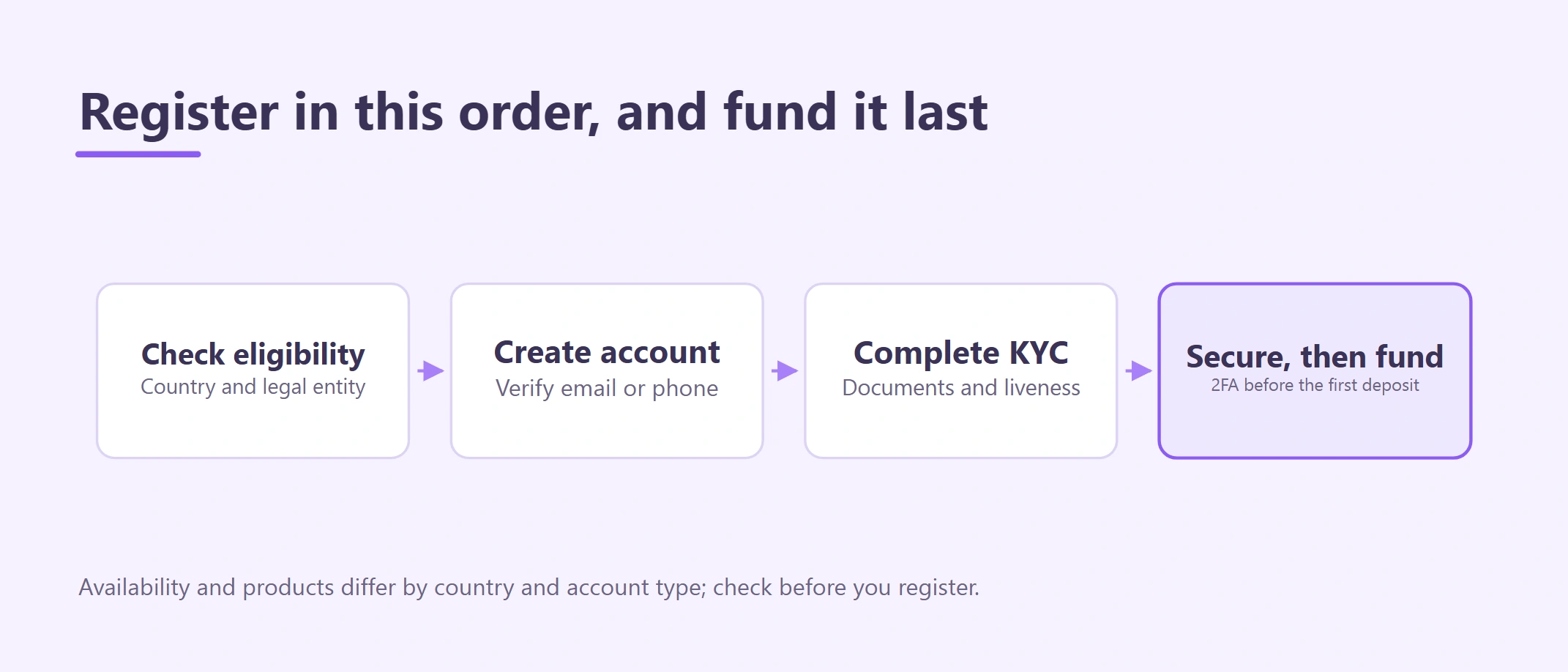
This guide shows how to register a Binance account with email or phone, review an invitation benefit before submitting, complete identity verification, secure the empty account, and test a small first deposit. References reviewed August 26, 2026.
It is written for a new personal account. Product availability, verification results and account features can differ by location and account eligibility.
This article covers account creation. Continue with the separate guides for Binance KYC requirements, securing a Binance account and Binance deposit and withdrawal troubleshooting.
How to register a Binance account with invite code BN7796
Invitation benefit for eligible new users
Binance runs two referral modes and attributes a new user to only one of them. What an invited user can receive is a trading fee rebate voucher after completing the qualifying tasks on the live activity page — not a percentage cut of your fee rate. Amounts, tasks and regional availability are set by Binance and shown in your own account.
Create a Binance account with invite code BN7796
Promotional link. Cryptocurrency trading involves risk and this is not investment advice.
Open the registration page, select the correct country or region, and use accurate personal information. The signup flow does not always show a referral field, so a missing field is not proof that the invitation failed — confirm the referral relationship inside your own account after registering (Step 2).
Before you begin: the 10-minute checklist
Prepare:
- an email address or phone number you control long term;
- a unique password saved in a reputable password manager;
- your genuine identity information and an unexpired document;
- a personal device with an updated browser or the app;
- enough uninterrupted time to read every regional and legal-entity notice.
Stop before signup if you are below the required age, the page says the service is unavailable, or you would need a VPN, false address, borrowed identity, or another person's account to continue.
Step 1: confirm country, service and legal entity
Open the approved invitation link and read the location notice before entering personal data. Binance may route visitors to a regional service, show a reduced feature set, or decline registration. Use your real residence and follow the terms displayed for the entity that would serve your account.
For a reader in Cambodia, an accessible website or an old cooperation announcement is not proof that every product is locally authorized. Check the current SERC FinTech Regulatory Sandbox list and the National Bank of Cambodia's current Prakas and Circulars. If the current sources and the signup screen do not give a clear answer, pause and obtain qualified local guidance.
Step 2: understand what an invitation actually gives you
Binance's referral FAQ, updated 25 March 2026, describes two modes, and a new user can be attributed to only one:
| Mode | Who receives what | Conditions stated by Binance |
|---|---|---|
| Referral (Lite) | The invited user and the referrer can each receive trading fee rebate vouchers | Up to USD 100 equivalent after a crypto purchase of USD 50 or more; up to USD 1,000 equivalent each after a trading-volume task of USD 100 or more. Vouchers are issued within 48 hours of each completed task, must be redeemed within 7 days and stay valid for 14 days after activation |
| Referral Pro | The referrer receives a share of the trading fees the invited user pays | Binance publishes tiered commission rates for the referrer. It is paid out of Binance's own fee revenue and does not change the fee rate you are charged |
Two things follow. A rebate voucher offsets Spot trading fees after you trade; it is not a discount applied to your fee tier. And a referral code does not move you onto a cheaper published fee schedule.
Which mode a given code belongs to, and whether the activity currently runs in your region, is shown by Binance rather than by this page. After registering, open the referral or rewards area of your own account and check whether an invitation relationship is recorded and which tasks remain outstanding. If nothing is recorded and you expected it to be, ask official Binance support before trading on the assumption of a reward.
An invitation code never requires a separate crypto payment to activate. Do not send money, passwords or verification codes to anyone offering to apply the benefit manually.
Step 3: choose personal or entity registration
Use a personal account only for yourself. If a registered company will own the funds, receive client payments, or need multiple authorized operators, review the entity-account requirements before creating anything. Converting an incorrectly opened personal account later may not be simple.
Use a contact method you expect to retain. Secure the connected email separately because it may be used for login, recovery, security alerts, and withdrawal confirmations.
Step 4: create and verify the account
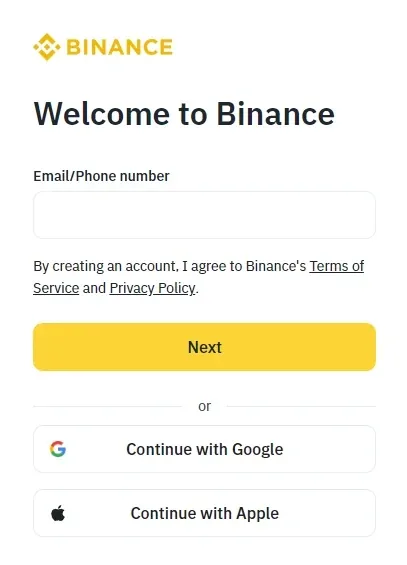
Binance Academy's public registration example, checked 2026-08-26. Use it to recognize the signup flow, then follow the country, language and fields shown in your own live account.
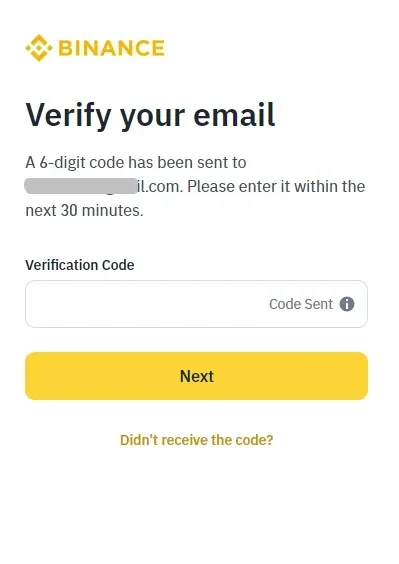
Binance's example, checked 2026-08-26, shows the six-digit email-code step with the example address already masked. Never share this code with another person.
- Enter your email address or phone number on the signup form.
- If a referral field is displayed, check it before submitting. If no field appears, continue — the code can travel with the link — and verify the relationship in your account afterwards.
- Enter the verification code only on the same flow.
- Create a unique password and save it securely.
- Record the date, account type, serving entity and masked contact detail for your own records.
An unexpected verification code means somebody may be trying to register or access an account with your contact information. Do not share the code. Secure the email or phone account and investigate.
Step 5: complete identity verification
Account creation and identity verification are different milestones. Some functions remain unavailable until KYC is complete. Submit only accurate information and genuine documents through the account flow. Never buy a verified account, edit an ID image, or send a selfie to a “verification agent.”
Use the companion Binance KYC requirements to prepare documents, prevent name and address mismatches, and handle Pending or Rejected status safely.
Step 6: secure the empty account
Before adding money:
- enable a passkey, authenticator, or the strongest suitable second factor shown;
- set an anti-phishing code if available;
- review devices and active sessions;
- understand withdrawal allowlisting and security delays;
- bookmark the sign-in page;
- secure recovery material offline.
Complete the securing a Binance account. Support should never need your password, OTP, authenticator recovery key, passkey recovery material, or self-custody seed phrase.
Step 7: test the first deposit
Do not make a large first transfer. Open your own live deposit screen, select the asset, choose a network supported by the sender, copy the newly displayed address and memo, and read the minimum and confirmation requirements. Send a small amount above the displayed minimum and wait for the credited balance.
Never copy a deposit address from an article or screenshot. Follow the Binance deposit and withdrawal troubleshooting for the exact verification sequence.
What to do if something goes wrong during signup
| What you see | What it means | Safe next action |
|---|---|---|
| No referral field, or it appears blank | The signup flow does not always display the code | Finish registration, then check the referral/rewards area of your account; ask official support if no relationship is recorded |
| Regional redirect or unavailable notice | A different entity or eligibility rule applies | Read that page; do not bypass it with a VPN |
| Verification email or SMS never arrives | Contact detail, filtering, rate limit, or service issue | Recheck the detail, wait, then use support |
| KYC is Pending | Review is not complete | Read the account notice and wait or supply only the requested item |
| KYC is Rejected | A specific field, document, image, or eligibility issue exists | Correct the stated cause; do not create repeated accounts |
| Someone asks for payment to activate registration | It is not a normal signup step | Stop, preserve evidence, and use support |
When registration is complete
Treat the account as ready only when:
- the account belongs to you and uses your accurate details;
- the referral relationship was confirmed inside the account after registering, if a referral is being used;
- the account shows the required identity-verification status;
- strong login security and recovery are configured;
- regional/product eligibility is clear in your own account;
- a small test deposit, if needed, is credited on the correct network.
Registration is not permission to deposit money you cannot afford to lose, and KYC approval is not an endorsement by a regulator.
Frequently asked questions
Can I add a referral code after registration? Binance attributes the referral at signup, so do not count on adding it later. If you intended to use one, check your account's referral or rewards area and ask official support if nothing is recorded.
Should I use a VPN if the page redirects or blocks registration? No. Location masking can conflict with residence and identity data and does not create lawful eligibility.
Can support ask for my OTP or password? Never send a password, OTP, passkey secret, authenticator recovery key, or wallet seed phrase to a person claiming to be support.
References
- Binance: Introduction to the Binance Referral Program
- Binance Academy: Binance Beginner's Guide
- Binance Academy: Complete Identity Verification
- SERC: FinTech Regulatory Sandbox
- NBC: Prakas and Circulars
Educational information only, not legal, tax, investment, or eligibility advice. Interfaces, services, fees, limits, referral terms, and verification requirements can change by location and account.