
Cross-Border Payments
Client Says They Paid but the USDT Hasn’t Arrived: Check the TxID
A client says they paid in USDT and nothing has arrived. Ask for the TxID, read it on the right explorer, and work out who has to act next.
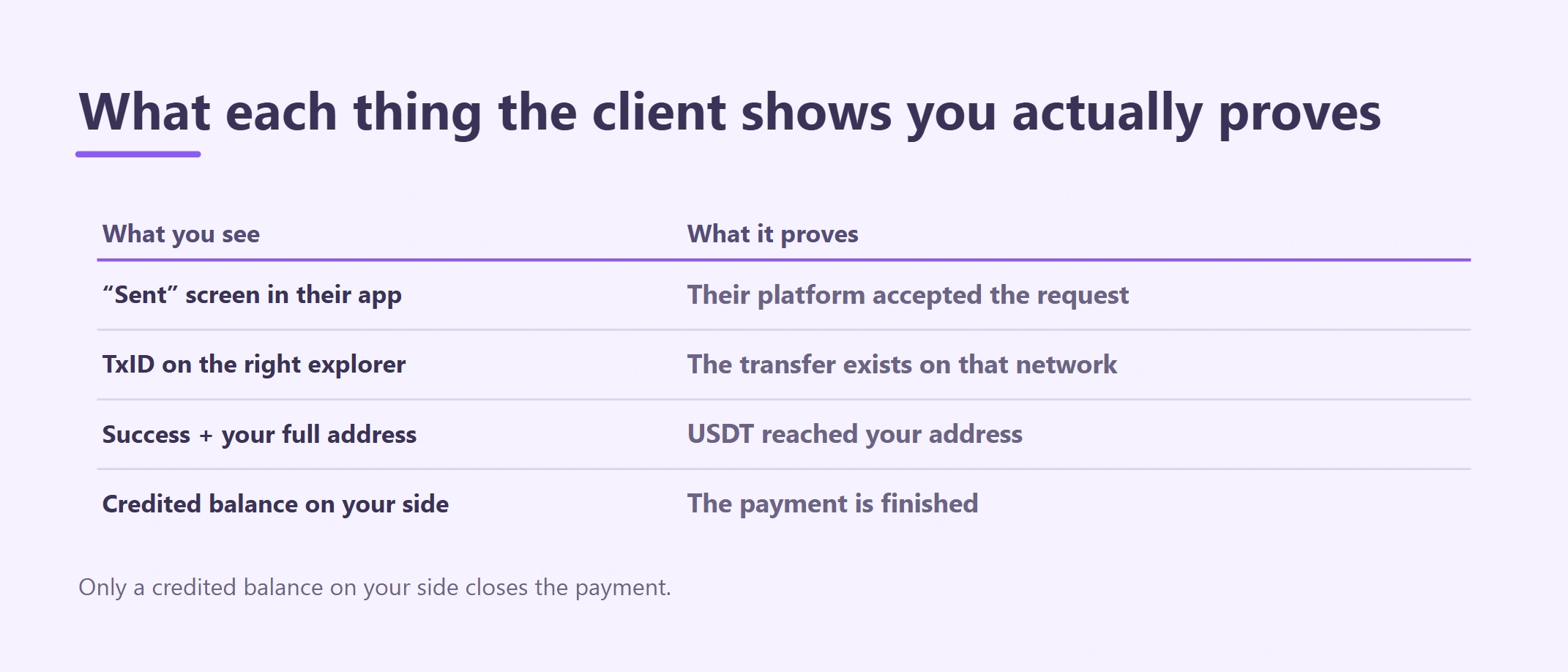
A client messages you: "I paid yesterday." You open your wallet or exchange account and nothing new is there. Before you argue about whose fault it is, or send the address again, ask for the transaction ID (TxID) and check the transfer yourself. A TxID lets both of you look at the same public record instead of trading screenshots.
This guide is for freelancers and small businesses in Cambodia who invoice in USDT. It covers the receiving side: what to ask the client, how to read the record, and what each result means for who acts next. If you already know the USDT reached a Binance deposit address and it is still not credited, go straight to Binance deposit not credited: what to check.
What to ask the client for first
One short message usually saves a day of back-and-forth. Ask for four things together:
- The TxID (also called the transaction hash). Not the order number or withdrawal ID from their app.
- The network they selected, for example TRON (TRC-20), Ethereum (ERC-20) or BNB Smart Chain (BEP-20).
- The full address they sent to, copied from their withdrawal history, not retyped.
- The amount and the time they pressed send, with the time zone.
A message you can adapt:
Thanks for paying. I can't see it on my side yet. Could you send me the TxID (transaction hash) from your withdrawal history, the network you chose, and the receiving address shown in that record? I'll look it up on the blockchain explorer right away.
A screenshot of a "Withdrawal submitted" or "Completed" screen is not enough. It shows that the client's platform accepted a request; it does not show where the money went. Screenshots are also easy to edit, a common trick in the scams described in crypto scam red flags.
How to recognise a real TxID
Each network formats its TxID a little differently, and the format already hints at which explorer to use.
| Network | What the TxID looks like | Where to look it up |
|---|---|---|
| Ethereum (ERC-20) | 0x + 64 letters and digits |
etherscan.io |
| BNB Smart Chain (BEP-20) | 0x + 64 letters and digits |
bscscan.com |
| TRON (TRC-20) | 64 letters and digits, no 0x |
tronscan.org |
Ethereum and BNB Smart Chain hashes look identical. If a hash is "not found" on one, try the other before concluding anything — the client may have picked a different network than the invoice asked for.
If the client has no TxID at all, their platform may still be processing the withdrawal, or it may have settled the transfer inside its own system. Some exchanges move funds between two of their own users without touching the blockchain and label it an internal transfer. In that case there is no public TxID, and only the receiving account's history can confirm it.
Reading the transfer on the explorer
Paste the TxID into the search box of the matching explorer. Below is a real USDT transfer on Ethereum, captured on 12 October 2026:
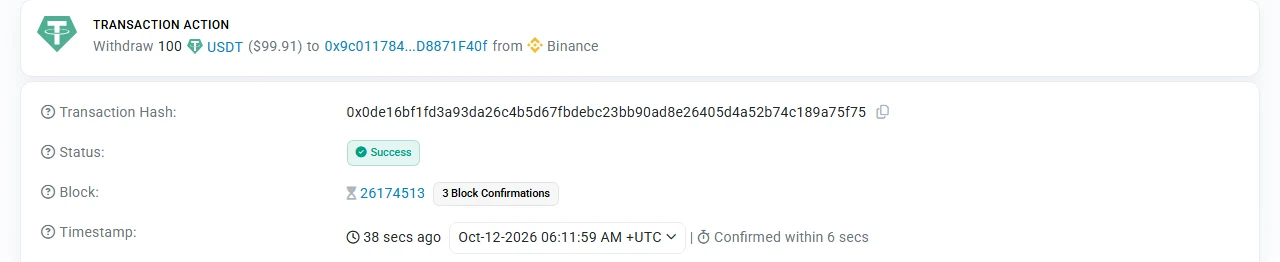
A real Etherscan record: the summary line names the token (USDT), the amount (100) and the destination address, followed by the status and the number of confirmations so far.
Read these lines in order:
- Status.
Successmeans the transfer executed.Failedmeans no USDT moved, although the sender still paid a network fee.Pendingmeans it has not been included in a block yet. - Token and amount. Make sure it is USDT and not another token with a similar name or logo, and compare the amount with your invoice.
- Destination address. Compare the full address with the one on your invoice, character by character — not just the first and last few. Lookalike addresses are made to pass a quick glance.
- Confirmations and timestamp. The confirmation count rises as new blocks are added. Your exchange credits the deposit only after its own required number, which it shows on its deposit page.
The sending side may carry a label such as "Binance 16". That only means the client withdrew from an exchange; it says nothing about which customer sent it.
Six results and who acts next
| What you find | What it means | Next step |
|---|---|---|
| No TxID yet, or the client's history says Processing | The withdrawal has not been sent to the blockchain | The client follows up with their own platform |
| TxID not found on the agreed network | Wrong explorer, or a different network was used | Search the other explorers; if it went over a network you don't support, read choosing the right USDT network |
| Success, but the destination is not your address | Sent to an old, mistyped or lookalike address | You did not receive it; the sender must raise it with their provider. Don't mark the invoice paid |
| Success to your address, confirmations still rising | It is on its way | Wait for your platform's confirmation requirement; don't ask for a second payment |
| Success to your address, enough confirmations, balance not credited | Often a missing memo, an amount below the deposit minimum, or a token your platform doesn't support | Contact your receiving platform's official support with the TxID |
| Failed | The transfer did not execute | The client sends again; the failed attempt cost them only the network fee |
The fourth row is where many "I paid but you didn't get it" messages end. Sometimes it is simply too early.
What not to do while you check
- Don't send a new address in a hurry. Changing the receiving address mid-dispute is exactly what invoice fraudsters exploit. Keep the address on the invoice, and if you must change it, tell the client through the channel you always use.
- Don't ask for a second payment until you have ruled out "still confirming". Two payments for one invoice turn a short wait into a refund.
- Don't trust anyone who says the money is "held" until you pay a release fee or share a recovery phrase. No legitimate wallet or exchange asks for that.
- Don't treat a screenshot as proof of payment. The TxID and your own credited balance are the proof.
For new clients or large invoices, a small test payment first prevents most of these problems — see why to send a small test transaction.
Keep the TxID with the invoice
Once the payment is credited, write the TxID, network, amount received and date next to the invoice number. If your bank later asks where the money came from, or the client questions the payment months later, that one line is what you will need. The crypto invoice template has room for it.
If you suspect fraud rather than a delay, Cambodia's CamCERT and the national police hotline are the local places to report it.